
The BehaviorUX Canvas
A one-page framework that brings behavior-change research into the design process your product team already uses.
Download the free canvas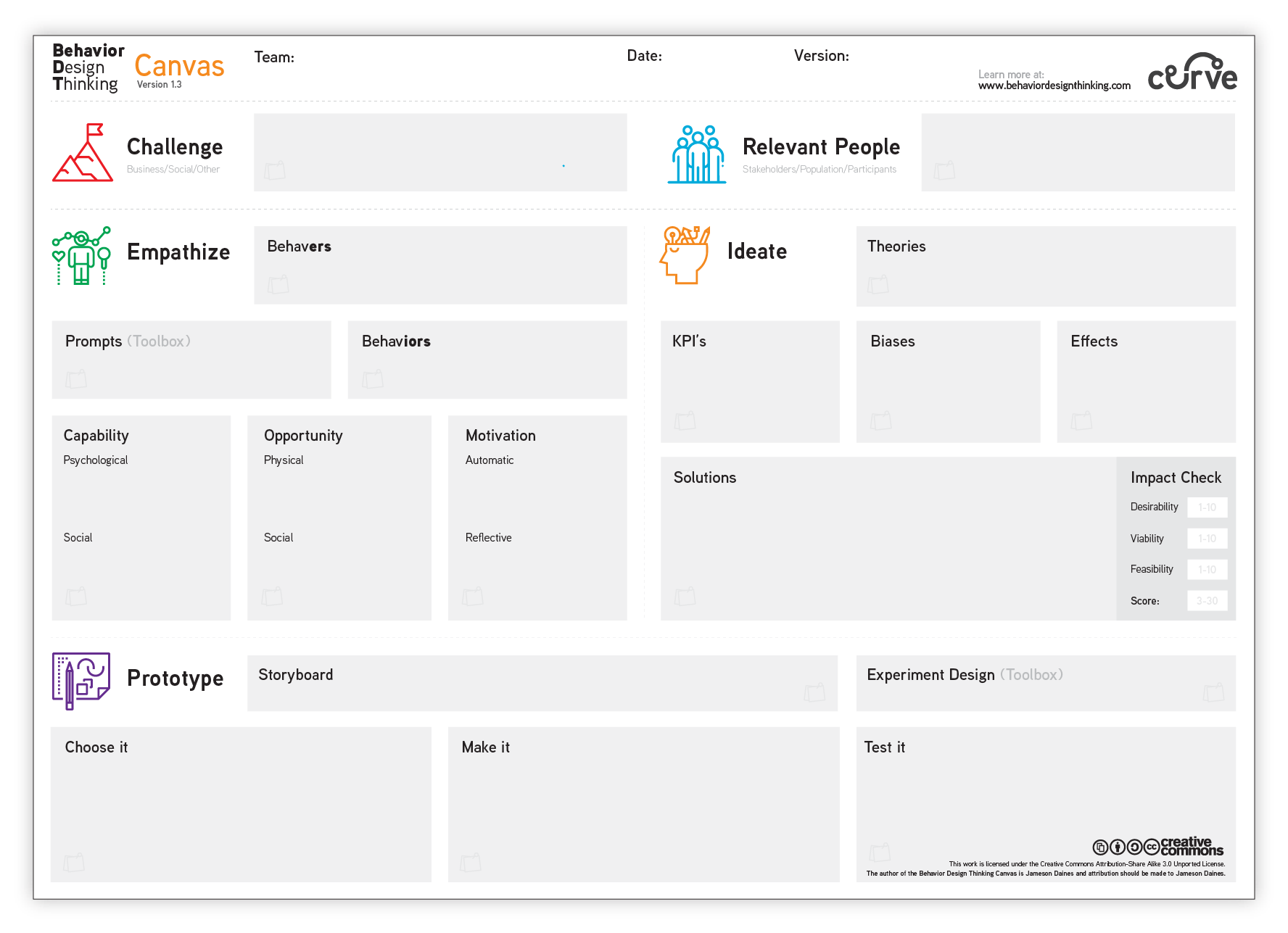
HOW IT’S DIFFERENT
A canvas that puts behavioral science and design thinking on the same page.
The canvas walks a team through three phases of behavior-centered design: understanding your audience’s psychology, generating ideas with the help of published theories, then prototyping and testing the ones worth prototyping.
Behavioral science and creative problem-solving are not opposites. The toolbox turns the research into something a team can pick up in a workshop and have ideas on paper by lunch.
STANDARD DESIGN THINKING
Define your challenge
Identify relevant people
Empathize, Ideate, Prototype
THE BEHAVIORUX APPROACH
Utilize behavioral theory to understand needs (Empathize)
Use behavioral theories, biases, and effects to create solutions (Ideate)
Discover experimental designs to use in rapid testing (Prototype)
PHASE 01
Empathize
Think about your audience as “behavers” rather than “users.” The difference matters: a user can click the button, a behaver actually has to form the intention, live in an environment that lets them do it, and want to.
The empathize phase uses the COM-B model from behavior-change research to break that down:
What you'll learn
- Understand your audience in terms of "behavers"
- Learn to use prompts from the behavioral toolbox
- Categorize behaviors using the COM-B system
PHASE 02
Ideate
Pull published behavior-change theories and cognitive biases off the toolbox shelf and use them to generate ideas that have a reason to work, instead of ideas that only felt clever in the workshop.
The ideate phase builds your KPIs directly into the scoring, so you can rate each idea on:
1-10
Desirability
1-10
Viability
1-10
Feasibility
What you'll learn
- Apply plug-and-play validated behavioral theories
- Integrate your KPIs into the solution-creation process
- Use behavioral biases and effects in your design process
PHASE 03
Prototype
Storyboard the intervention, pick an experimental design from the toolbox, and run it through a short build-and-test loop before you commit engineering time to it.
The prototype phase has three steps:
What you'll learn
- Become an expert at behavioral storyboarding
- Learn how to choose your prototypes based on science
- Explore the process of creating a behavioral prototype
COMPANION RESOURCE
The Behavior Toolbox
The canvas ships with a companion reference: a plain-language collection of the behavioral science principles I keep reaching for on real projects, sorted by the phase where they’re useful.
Empathize Prompts
Knowledge & Skills
Social/Professional Identity
Beliefs about Capabilities
Beliefs about Consequences
Reinforcement
Intentions & Goals
Memory/Attention/Decision Processes
Environmental Context
Social Influences
Emotion
Behavioural Regulation
Optimism
Ideate: Theories, Biases & Effects
Common Theories
Theory of Planned Behavior
Social Cognitive Theory
Operant Learning Theory
Health Action Process Approach
Common Biases
Loss Aversion
Anchoring
Default Bias
Hyperbolic Discounting
Goal Gradient Theory
Herding
Scarcity
Self-Signaling
Status Quo Bias
Endowment Effect
Sunk Cost Effect
Reciprocity
The toolbox is the shortcut to getting comfortable with a working set of behavior-change theories and cognitive biases, and to prototyping the way a behavior scientist would.
Ready to use The BehaviorUX Canvas?
Grab the canvas and the companion toolbox. Both are Creative Commons, so use them on whatever you’re working on.